
This article contains affiliate links. We may earn a commission if you make a purchase through these links.
The best VPNs for Windows 11 should do more than simply change your IP address. A good Windows VPN should encrypt your internet connection without making everyday browsing painfully slow, provide a straightforward Windows app, and include useful protections such as a kill switch and DNS leak protection.
For most people, the right choice depends on why they want a VPN in the first place. Someone who mainly connects to public Wi-Fi has different priorities from a frequent traveler, a heavy streamer, or someone who simply wants more privacy from their internet provider.
We’ve narrowed the options to seven VPNs that make sense for different types of Windows 11 users, including premium services, a genuinely useful free option, and a lower-cost choice for people who don’t need a long list of extras.
The Best VPNs for Windows 11 at a Glance
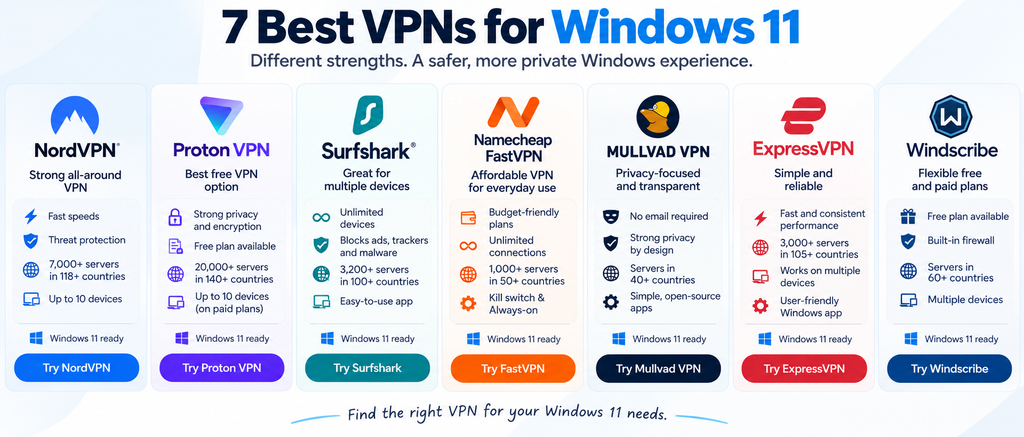
| VPN | Best For | Pricing | Free Plan | Devices | Notable Windows Features |
|---|---|---|---|---|---|
| NordVPN | Strong all-around option | From $3.49/month on a 2-year Basic plan | No | Up to 10 | Kill switch, split tunneling, threat protection |
| Proton VPN | Free VPN option | Free plan; paid plans from about $2.99/month with current long-term offers | Yes | Up to 10 on paid plans | Kill switch, Secure Core, split tunneling |
| Surfshark | Multiple devices | From $2.49/month on a 2-year Starter plan | No | Unlimited | Kill switch, Bypasser, CleanWeb |
| Namecheap FastVPN | Affordable everyday use | Low-cost introductory and long-term plans; check current offer | Trial available | Unlimited privacy-server connections | Kill switch, AutoConnect, Always-on |
| Mullvad VPN | Privacy-focused users | €5/month flat rate | No | Up to 5 | Kill switch, WireGuard, straightforward app |
| ExpressVPN | Simplicity and travel | From about $3.49/month depending on plan and term | No | Varies by plan | Kill switch, split tunneling, simple Windows app |
| Windscribe | Flexible free usage | Free; Pro $9/month or $69/year | Yes | Multiple devices | Firewall, split tunneling, configurable connection options |
Pricing checked in September 2026. Promotional prices, renewal rates, taxes, and plan features can change. Long-term prices shown as monthly equivalents may require payment for the full subscription term upfront.
What Should You Look for in the Best VPNs for Windows 11?
A VPN shouldn’t make using Windows more complicated. Ideally, you install the app, sign in, choose a server, and connect. Advanced settings should be available when you need them without getting in the way of basic use.
A kill switch is particularly useful. If the VPN connection unexpectedly drops, the kill switch can prevent your normal internet connection from taking over and exposing traffic you intended to send through the VPN.
Server availability matters as well. More locations give you greater flexibility when traveling or when you need an IP address from a particular region, although the raw number of servers isn’t a reliable measure of quality by itself.
Speed is another consideration because encrypting and routing traffic through a VPN server introduces some overhead. The impact varies depending on the VPN, protocol, server distance, network congestion, and your own internet connection.
Finally, don’t treat a VPN as a replacement for normal Windows security. A VPN protects network traffic; it doesn’t make suspicious downloads, phishing emails, weak passwords, or malware harmless. Basic PC troubleshooting and maintenance practices still matter even when your VPN is connected.
1. NordVPN — Strong All-Around VPN for Windows 11
NordVPN is a good starting point for Windows users who want a combination of privacy features, straightforward everyday use, and additional security tools without having to configure everything manually.
Its current plans support up to 10 simultaneous device connections. The service also includes phishing protection on its Basic tier, while higher plans add features such as anti-malware protection, an ad and tracker blocker, and other security tools.
The Windows experience is approachable enough for beginners. You can connect without spending much time in the settings, while more experienced users have additional options available when they want greater control.
That balance is important. Some VPNs are wonderfully configurable but can feel intimidating if all you want to do is secure a laptop before connecting to hotel Wi-Fi.
Best for: Windows users who want a well-rounded VPN with room for additional security features.
2. Proton VPN — One of the Best VPNs for Windows 11 With a Free Plan
If you don’t want to pay immediately, Proton VPN is one of the more interesting options because it maintains a free VPN service rather than simply offering a short trial.
Its Windows application includes several security features even at the free level, including a kill switch and DNS/IPv6 leak protection. Paid Proton VPN plans expand the service with features such as split tunneling, P2P support, additional servers and secure streaming. Proton says its paid service currently supports up to 10 simultaneous devices and more than 20,000 servers across more than 140 countries.
The Windows app also supports technologies such as WireGuard, OpenVPN and Proton’s Stealth protocol, along with more advanced options including custom DNS and connection profiles.
The free plan makes Proton particularly useful if you’re new to VPNs and want to understand how one affects your normal browsing before committing to a subscription.
Best for: Anyone looking for a credible free starting point or more advanced privacy controls.
3. Surfshark — Best for Lots of Devices
A VPN subscription becomes less attractive if you have to start counting devices every time you install the app somewhere new.
That’s one of Surfshark’s main advantages. Its service supports unlimited device connections, making it particularly useful for households with several computers, phones, tablets, and streaming devices.
On Windows, Surfshark offers more than a basic connect button. Its Bypasser feature provides split tunneling, allowing selected apps or websites to bypass the VPN when necessary. CleanWeb can also block ads, trackers, malware, and phishing attempts.
Those features can be useful when a particular application doesn’t work well through a VPN or when you only want certain traffic protected.
Surfshark’s pricing tends to favor longer subscriptions. At the time of writing, its promotional Starter offer is considerably cheaper per month on a multi-year commitment than paying month-to-month, so it’s important to look at the total upfront price and eventual renewal terms, not just the large monthly-equivalent number displayed on the pricing page.
Best for: Families and users who want one VPN subscription across many devices.
4. Namecheap FastVPN — Affordable VPN for Everyday Windows Use
Namecheap FastVPN takes a relatively straightforward approach. Instead of trying to turn the VPN into an enormous cybersecurity suite, it covers many of the features everyday Windows users are likely to care about.
Its Windows app includes a kill switch, AutoConnect, Always-on protection and leak-related controls. Namecheap also advertises unlimited bandwidth and connections across unlimited devices when using its privacy servers.
That makes FastVPN worth considering if your main goal is securing everyday browsing, using public Wi-Fi more safely, or hiding your normal IP address without paying for a bundle of unrelated extras.
Price is one of its stronger selling points. Namecheap currently advertises a 30-day introductory period on its monthly option and discounted longer-term plans, although promotional and renewal pricing can change.
FastVPN isn’t automatically the right choice simply because it costs less. Users who want a particularly extensive collection of specialist privacy controls may prefer one of the more advanced services on this list. But for someone who wants a Windows VPN that’s easy to understand and relatively inexpensive, it fills a useful position.
Best for: Windows users looking for a straightforward, budget-conscious VPN.
Try Namecheap FastVPN for free for simple, affordable VPN protection across your Windows devices.
5. Mullvad VPN — Best for Privacy-Focused Windows Users
Mullvad takes a noticeably different approach from many mainstream VPN providers. Instead of encouraging long subscriptions with large introductory discounts, it keeps its pricing simple and puts much of its attention on reducing the amount of personal information needed to maintain an account.
You don’t need to provide an email address when creating a Mullvad account. The service generates an account number instead, which is then used to sign in. Mullvad also publishes information about its infrastructure, apps, security practices, and independent audits.
The Windows app supports WireGuard and includes a built-in kill switch designed to prevent traffic from leaking outside the VPN if the connection fails. Mullvad also offers split tunneling on Windows, which can be useful when one application needs your normal internet connection while the rest of your traffic continues through the VPN.
Pricing is another unusual aspect. Mullvad charges a flat €5 per month, whether you pay for one month or add more time. There isn’t a multi-year contract that dramatically reduces the advertised monthly equivalent.
The trade-off is that Mullvad doesn’t focus as heavily on bundled extras or heavily marketed streaming features. Its appeal is more straightforward: a VPN for people who place privacy and transparency high on their list of priorities.
Best for: Privacy-conscious Windows users who prefer simple pricing and don’t want to provide unnecessary personal information.
6. ExpressVPN — Best for a Simple Windows Experience
ExpressVPN is aimed at users who want their VPN to be relatively easy to operate without spending much time adjusting technical settings.
Its Windows app supports Windows 10 and 11 and uses ExpressVPN’s Lightway protocol alongside features such as Network Lock, its version of a kill switch. Split tunneling is also available on supported Windows configurations, allowing you to decide which applications use the VPN connection.
That simplicity can be valuable for people who travel frequently. If you’re connecting a laptop to hotel, airport, café, or other unfamiliar networks, you may prefer an app where connecting to an appropriate VPN server takes only a few clicks.
ExpressVPN isn’t necessarily the obvious choice for someone whose main priority is paying as little as possible. Its value proposition is more about combining an approachable interface with a mature VPN service and a broad server network.
Best for: Travelers and Windows users who prioritize a straightforward VPN experience.
7. Windscribe — Flexible Free and Paid VPN Options
Windscribe is another interesting choice if you’re not ready to commit to a paid VPN subscription.
The free version provides a practical way to try the service, although its usage and server access are more limited than the paid plan. Windscribe’s current Windows application includes its Firewall feature, which is designed to prevent connectivity outside the VPN tunnel, along with split tunneling and several connection options.
One advantage is that users aren’t forced immediately into an all-or-nothing decision between a free service and a full subscription. Windscribe also offers a Build-a-Plan option alongside its regular Pro service, allowing users to construct a smaller paid configuration around selected locations and features.
That flexibility makes it worth considering if your VPN needs are occasional rather than constant.
Best for: People who want to start free or prefer more flexibility in how they pay for VPN access.
Which of the Best VPNs for Windows 11 Is Right for You?
Choosing among the best VPNs for Windows 11 becomes much easier once you identify why you actually need one.
If you want a broad combination of features and ease of use, NordVPN is a strong general-purpose option. Proton VPN stands out if having a useful free tier matters, while Surfshark is particularly convenient when you have a large number of devices.
Namecheap FastVPN occupies a different position. It’s worth considering when you want straightforward Windows VPN protection at a relatively accessible price without needing an extensive collection of additional security products.
Mullvad is particularly interesting for privacy-conscious users, ExpressVPN emphasizes an easy everyday experience, and Windscribe gives people more flexibility when they don’t immediately want a conventional paid subscription.
Don’t choose solely by looking at the lowest advertised monthly figure. VPN providers frequently calculate that number from long-term subscriptions, meaning you may need to pay for a year or more upfront. Check the initial total, renewal price, refund terms, and included features before subscribing.
Do You Really Need a VPN on Windows 11?
Not everyone needs to keep a VPN connected every minute of the day.
A VPN is particularly useful when you want to reduce how much of your internet activity is visible to the local network or internet provider, use unfamiliar public networks, or connect through an IP address in another location.
However, it doesn’t replace antivirus protection, software updates, careful browsing, or backups. A malicious attachment remains malicious after it passes through an encrypted VPN connection.
Windows users should therefore think of a VPN as one layer of a broader security setup. Keeping Windows and applications updated, using Microsoft Defender or another reputable security solution, and maintaining backups are still important. If you’re strengthening your overall setup, these steps for protecting a Windows PC from ransomware address threats that a VPN itself cannot stop.
Free VPN vs Paid VPN: Which Makes More Sense?
A free VPN isn’t automatically unsafe, but the provider and business model matter.
Services such as Proton VPN and Windscribe offer free tiers alongside paid products. The free service acts as a limited version of a commercial VPN rather than depending entirely on an unknown source of revenue.
Free plans commonly restrict features, server locations, speeds, data usage, or some combination of these. That’s often acceptable if you only need a VPN occasionally.
A paid plan becomes more attractive if you use a VPN every day, regularly transfer large amounts of data, need more server locations, or want advanced features.
Be more cautious with obscure free VPN applications that provide little information about who operates them, how they make money, or what happens to connection data. Saving a few dollars isn’t worthwhile if the service introduces a different privacy problem.
Can a VPN Make Windows 11 Slower?
Yes, although the difference may be small enough that you barely notice it.
A VPN has to encrypt your traffic and route it through another server before it reaches its destination. The farther away that server is, the more latency can increase. Server congestion and the VPN protocol can also affect performance.
If your connection becomes noticeably slower, try a nearby server first. You can also experiment with another supported protocol or check whether the VPN is the actual cause by comparing speeds with it temporarily disconnected.
If the whole computer feels sluggish rather than just the internet connection, the VPN may not be responsible. Background programs, limited storage, startup applications, and other Windows issues can have a much larger effect. These ways to make a Windows PC faster can help separate general PC performance problems from VPN-related network slowdown.
FAQs
What is the best VPN for Windows 11?
There isn’t one VPN that is best for every Windows 11 user. NordVPN offers a broad feature set, Proton VPN provides a useful free option, Surfshark works well across many devices, while Mullvad emphasizes privacy and straightforward pricing. Your priorities should determine which is the better fit.
Does Windows 11 have a built-in VPN?
Windows 11 includes built-in functionality for creating VPN connections, but it doesn’t give you a commercial VPN service or a network of VPN servers. You still need connection details from an employer, organization, or VPN provider.
Is Microsoft Defender enough if I use a VPN?
The two tools perform different jobs. Microsoft Defender helps protect Windows against malware and other threats, while a VPN encrypts network traffic between your device and the VPN server. Using a VPN doesn’t replace antivirus protection.
Should I leave my VPN on all the time?
You can, but it isn’t necessary for everyone. Keeping it connected provides more consistent VPN coverage, while connecting only on public networks or when you specifically need a VPN can be more convenient for some users.
Are free VPNs safe for Windows 11?
Some reputable providers offer legitimate free tiers, but you should investigate the provider before installing one. Look at its privacy policy, company information, limitations, and how the free service is funded rather than choosing an unfamiliar VPN simply because it costs nothing.
Will a VPN protect me from hackers and malware?
A VPN can protect network traffic and reduce certain risks associated with untrusted networks, but it doesn’t make your computer immune to hacking, phishing, malicious downloads, ransomware, or other threats.
Final Thoughts
The best VPNs for Windows 11 aren’t necessarily the services with the biggest server count or longest feature list. What matters is whether the VPN provides the privacy, performance, device support, and ease of use you actually need at a price you’re comfortable paying.
NordVPN, Proton VPN, Surfshark, Namecheap FastVPN, Mullvad, ExpressVPN, and Windscribe approach that problem differently. For occasional users, a reputable free tier may be enough. For households with many devices, connection limits matter more. Privacy-focused users may care more about account design and transparency than bundled extras.
Whichever service you choose, keep expectations realistic. A VPN is useful for protecting network traffic and improving online privacy, but it works best as one part of a broader Windows security setup rather than as a replacement for good security habits.
Did this solve your problem?
Your answer helps Supportia prioritize updates. No account or email is required.
Related guides
Best PDF Editors for Windows and Mac in 2026
PDF files have become the standard format for contracts, invoices, reports, resumes, forms, and business documents. While almost every computer can open a PDF,…
Reviewed 2026-08-24The Best AI Productivity Apps for Windows and Mac in 2026
The challenge is no longer finding an AI app—it's choosing the right one. Hundreds of tools promise to improve productivity, but each is designed…
Reviewed 2026-08-24Best Solar Generators for Home Use in 2026: Top Options Compared
The best solar generators for home use in 2026 include the Jackery Explorer 1000 v2 for essential electronics, EcoFlow DELTA 2 Max for larger…
Historical guide — verify current details